Features

Everything Your Team Needs to Understand Its Time.

Desktop time tracking, screenshots and activity, projects and budgets, an AI assistant, reports, and integrations — one platform, not a patchwork of tools.

A team gathered around a laptop discussing work in a modern office
Track Time

Start, Pause, Resume, Stop — All From the Desktop.

The TimeNova desktop agent for Windows, macOS, and Linux runs timers locally, detects idle time with a configurable prompt, and keeps working offline — syncing automatically once you're back online. The web dashboard shows a live, real-time view of everyone currently tracking.

Design sprint00:23
Client review01:42
Development03:15
Understand Productivity

See the Work, Not Just the Hours.

Optional, configurable screenshots and activity scoring (based on keyboard and mouse input, never content) give visibility into progress. Opt-in app and window tracking shows where focus went, logging only the domain for browsers — never the full URL.

Screenshot capture preview with an activity highlightCaptured

85%

Activity

456

Keystrokes

78%

Productive

Manage Work

Projects, Tasks, and Budgets in One Place.

Organize tracked time by project and task, assign multiple people to a task, set hourly or cost budgets with alert thresholds, and route employee-created tasks through an approval workflow before they count toward the plan.

Projects
Tasks
Budgets
Roles
Support Teams

Ask, Don’t Dig.

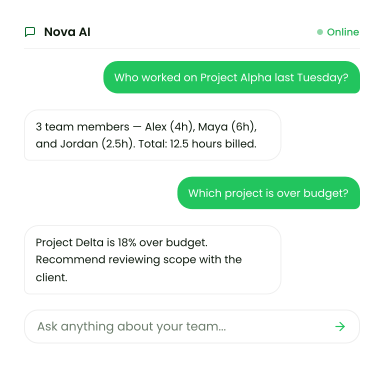
Ask TimeNova’s AI assistant questions about your team’s time in plain language, and — within your role’s permissions — have it create a project, add a task, or generate a report for you. Recent AI actions can be undone.

Nova AI assistant answering questions about who worked on a project and which project is over budget
Review Reports

Turn Hours Into Numbers That Matter.

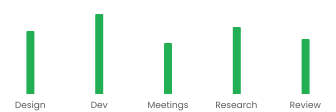
Daily, weekly, team, and custom reports, plus dedicated cost reports with per-project budgets. Export to CSV, or set up scheduled report emails on a daily, weekly, or monthly cadence for the people who need them.

Project Alpha — Cost Report

This Week
Bar chart of billed hours by category: Design, Dev, Meetings, Research, Review

$12,400

Total billed

$8,200

Total cost

$4,200

Margin

Connect Workflows

Fits Into the Tools You Already Use.

Import projects and tasks from ClickUp, Jira, Asana, Trello, Linear, or GitHub, and keep them in sync. Outbound webhooks let you send TimeNova events into your own automations, signed and with a delivery log you can inspect.

ClickUp logo
Jira logo
Asana logo
Trello logo
Linear logo
GitHub logo

More Built In

Everything Else That Comes With It

Two-factor authentication

Optional TOTP-based MFA with backup codes for every account.

Audit log

A record of admin and system actions across the organization.

Client portal

A read-only client role with per-project access to screenshots and activity.

Notifications

Real-time alerts for task assignment, approvals, budget alerts, and more.

Multi-org workspaces

Belong to and switch between multiple organizations from one account.

Goals

Set weekly target hours per member and track progress toward them.

Responsible Tracking

Monitoring, Configured Responsibly

  • Screenshot frequency, idle behavior, and window/app tracking are all set by an organization admin.
  • Screenshots and activity are only captured while a timer is running.
  • Anyone being tracked can see their own recorded activity from their account.
  • Access to reports, cost data, and screenshots is gated by role — employees don’t see org-wide financials by default.
  • Browser activity logs the domain only; full URLs and page content are never collected.
A lock resting on a computer keyboard, representing account and data security

Reporting & Insights

From Raw Time to Real Decisions

  • Daily, weekly, team, and custom-range reports, plus a dedicated cost report with per-project budgets.
  • An insights dashboard covering utilization, activity trends, top apps, and team benchmarks.
  • Export any report to CSV for further analysis.
  • Schedule recurring report emails on a daily, weekly, or monthly cadence, to any recipient list.

18%

Productivity

12%

Overtime

Stable

Meetings

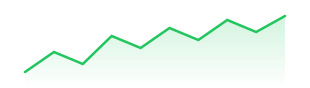
Team productivity — last 10 days

Line chart of team productivity trending over the last 10 days

Burnout risk detected

Sarah K. has logged 52h this week — above threshold.

Desktop Agent

The Agent That Does the Tracking

  • Runs quietly in the system tray on Windows, macOS, and Linux.
  • Keeps tracking fully offline and syncs automatically once you’re back online.
  • Checks for updates automatically and only restarts to apply one when you confirm.
  • Detects idle time and lets you keep, discard, or reassign it before it counts.
  • Captures screenshots on a configurable interval, with a heads-up before each one and a skip option.
Windows, macOS, Linux
Offline-first
Auto-sync
Auto-update

Who Gets What

Built for Every Role on the Team

CapabilityIndividualsTeamsManagersOrg Admins
Time tracking & desktop agent
Projects & tasksSelf-createdCreate & assign
Screenshots & activityOwn activityOwn activityTeam-wideOrg-wide + policy
Reports & cost tracking
Team & role managementProject-levelOrg-level
AI assistantSelf-scopeSelf-scope+ team data+ org actions
Multi-org workspaces
Integrations & webhooks

Feature FAQs

Common Questions

Start Tracking Smarter Today.

No credit card. No setup fees. Just clarity on where your time goes.